Let’s get straight to the point FindPagesWithCriteria is bad for you. It basically looks up the database to find the content that match your criteria. Because the search is not exact match but basically LIKE %abc%, which means every time you call FindPagesWithCriteria a full scan will be performed on your tblContentProperty table. IF your property is stored in a LongString column, things get much worse - as this column is a NVARCHAR(max) so key lookups will always be used.
This is how expensive the stored procedure is: it’s slow, it’s extremely IO heavy.
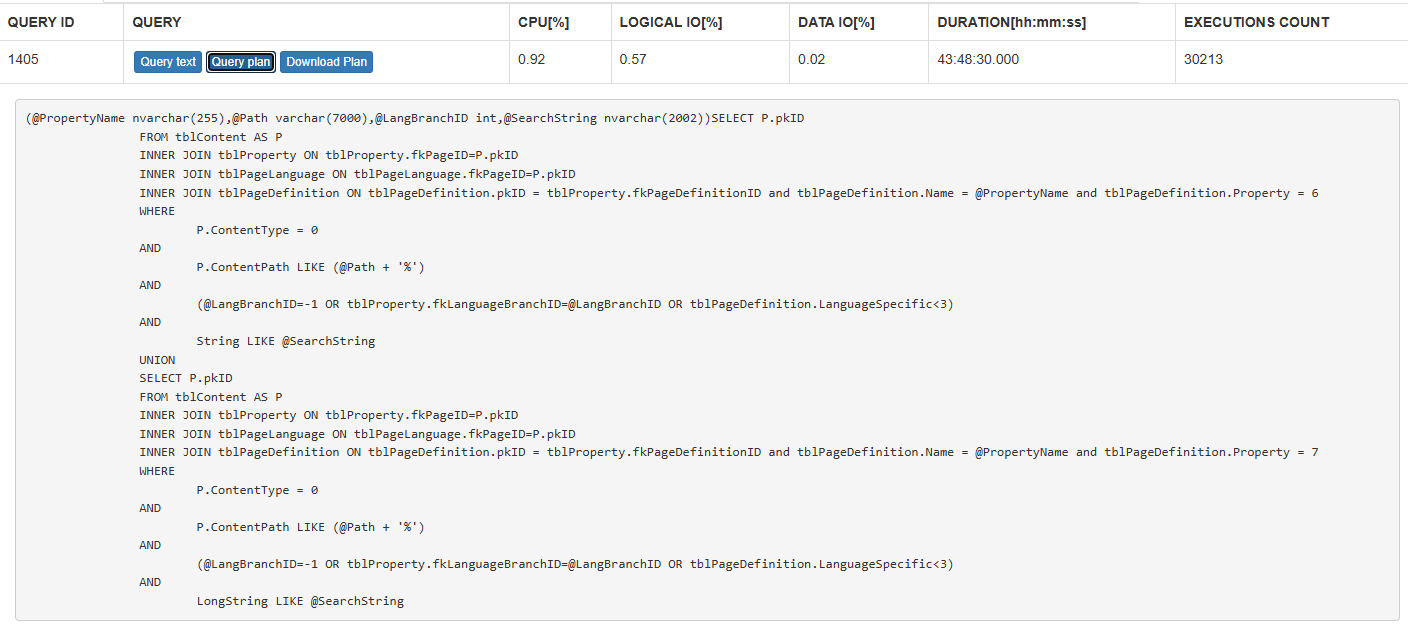
You can do better than that. Ditch it and use the like of indexed search. If you’re running on DXP you already have Search & Navigation at your disposal. Even if you don’t want to rewrite much of your code to use Find, this is how you can mitigate the problem - an immediate layer that allows you to keep the code but use Find internally. Yes, the irony is that my previous post is about how Find is not the answer for everything - this is exactly something Find is designed for - free text searching.
using System;
using System.Collections.Generic;
using System.Linq;
using EPiServer.Core;
using EPiServer.Find;
using EPiServer.Find.Cms;
using EPiServer.Find.Framework;

public class FindPageCriteriaQueryable : IPageCriteriaQueryable
{
    private readonly IClient _findClient;

    // Inject the Find client. Falls back to the Find client instance if not provided.
    public FindPageCriteriaQueryable(IClient findClient = null)
    {
        _findClient = findClient ?? SearchClient.Instance;
    }

    public PageDataCollection FindPagesWithCriteria(PageReference pageLink, PropertyCriteriaCollection criteria)
    {
        if (criteria == null || !criteria.Any())
        {
            return new PageDataCollection();
        }

        // 1. Start with a base type search for PageData
        var query = _findClient.Search<PageData>();

        // 2. Scope to a specific descendant branch if pageLink is provided
        if (!ContentReference.IsNullOrEmpty(pageLink))
        {
            query = query.Filter(x => x.Ancestors().Match(pageLink.ToString()));
        }

        // 3. Dynamically translate standard criteria to Find Filters
        foreach (PropertyCriteria criterion in criteria)
        {
            if (string.IsNullOrWhiteSpace(criterion.Name)) continue;

            query = ApplyCriterion(query, criterion);
        }

        // 4. Execute the search (limiting results safely, standard Find default is 10)
        // Adjust .Take() based on your typical legacy performance expectations
        var results = query.Take(1000).GetContentResult();

        // 5. Return as a legacy PageDataCollection
        return new PageDataCollection(results);
    }

    private ITypeSearch<PageData> ApplyCriterion(ITypeSearch<PageData> query, PropertyCriteria criterion)
    {
        // Handle common built-in properties.
        // For custom properties, you'll need to map via Find's dynamic field features.
        switch (criterion.Name.ToLowerInvariant())
        {
            case "pagetypereference":
                if (int.TryParse(criterion.Value, out int pageTypeId))
                {
                    return query.Filter(x => x.ContentTypeID.Match(pageTypeId));
                }
                break;

            case "pagename":
                if (criterion.Type == PropertyDataType.String)
                {
                    return criterion.Condition == CompareCondition.Count
                        ? query.Filter(x => x.PageName.Match(criterion.Value))
                        : query.Filter(x => x.PageName.Prefix(criterion.Value));
                }
                break;

            case "pagestartpublish":
                if (DateTime.TryParse(criterion.Value, out DateTime startPublish))
                {
                    return criterion.Condition == CompareCondition.GreaterThan
                        ? query.Filter(x => x.StartPublish.GreaterThan(startPublish))
                        : query.Filter(x => x.StartPublish.LessThan(startPublish));
                }
                break;

            // Add more cases here as dictated by your legacy code needs
            default:
                // Fallback: Attempting to query via dynamic fields if it's a custom property
                return ApplyDynamicCriterion(query, criterion);
        }

        return query;
    }

    private ITypeSearch<PageData> ApplyDynamicCriterion(ITypeSearch<PageData> query, PropertyCriteria criterion)
    {
        // Basic fallback handling for string-based custom properties
        return query.Filter(x => x.Field<string>(criterion.Name).Match(criterion.Value));
    }
}
The code is provided as-is, so use it at your own risk. But a few quick tests should reveal any problem and fixing it should be a quick task. Your database, and your website performance will thank you.