Cache is good. No, cache is critical - no performant website can go live without proper cache. But can you have too much cache? It turns out that having too much of “good things” can be bad. Sometimes, really bad. In this blog post, let’s explore how too much cache can be a bad thing.
The symptoms happened to two of our customers. I did write a draft the first time I worked on this issue, but I was busy with other stuffs, and details were lost with time. The second time, a colleague asked me to look into a case where memory usage looks like this
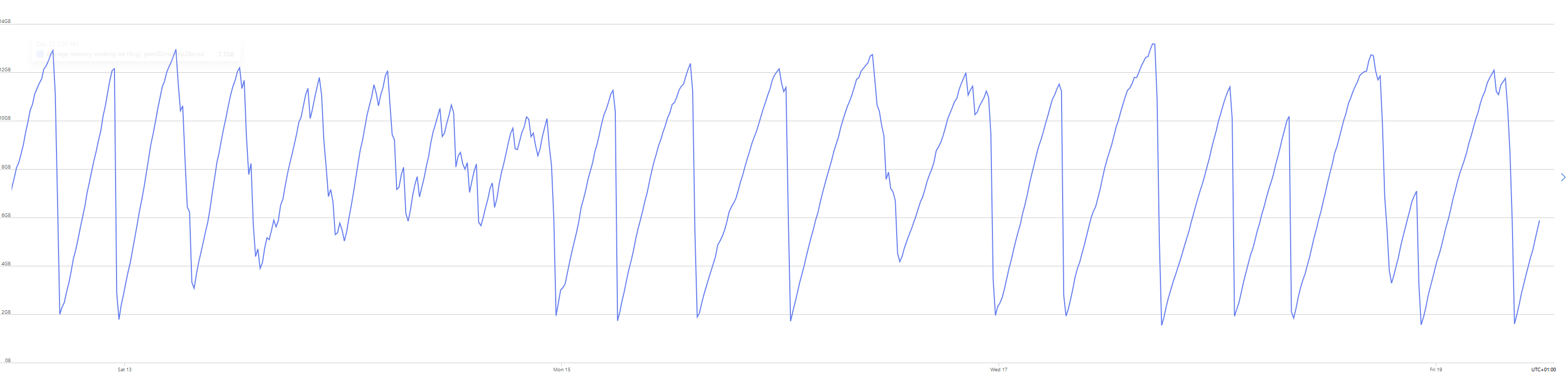
I jokingly call this the saw of death. Such raise and fall of memory usage means that something is holding up memory until a heavy Gen2 kicks in and clear a big chunk of memory. As usual, memory dump is taken and we go through some basic check with threads, and heap stat. One thing immediately caught my eyes.
Live Threads Count: 806
Dead Threads Count: 2
Cpu Utilization: 44%
Thread Pool Min Threads: 4
Thread Pool Max Threads: 32767
Thread Pool Active Worker Threads: 785
The number of threads is very suspicious, and more interestingly, most of them are doing nothing
Managed callstack:
  [HelperMethodFrame_1OBJ] (System.Threading.Monitor.ReliableEnter)
  System.Threading.TimerQueueTimer.Fire(Boolean)
  System.Threading.ThreadPoolWorkQueue.Dispatch()
  System.Threading.PortableThreadPool+WorkerThread.WorkerThreadStart()
  [DebuggerU2MCatchHandlerFrame]
The number of threads is of course not normal, so something is probably wrong (of course!). The stacktrace indicates that some job is scheduled to run by a Timer. By looking at the timer, maybe we can find what has caused this many threads to be created.
0:812> !clrstack -p
OS Thread Id: 0x52a2 (812)
        Child SP               IP Call Site
00007F4CC05AC8B0 00007f55307097b2 [HelperMethodFrame_1OBJ: 00007f4cc05ac8b0] System.Threading.Monitor.ReliableEnter(System.Object, Boolean ByRef)
00007F4CC05ACA00 00007f54c062c087 System.Threading.TimerQueueTimer.Fire(Boolean) [/_/src/libraries/System.Private.CoreLib/src/System/Threading/Timer.cs @ 652]
    PARAMETERS:
        this (<CLR reg>) = 0x00007f5256bce458
        isThreadPool (<CLR reg>) = 0x0000000000000001

00007F4CC05ACA60 00007f54be8c3311 System.Threading.ThreadPoolWorkQueue.Dispatch()

00007F4CC05ACAE0 00007f54c2dc5f84 System.Threading.PortableThreadPool+WorkerThread.WorkerThreadStart() [/_/src/libraries/System.Private.CoreLib/src/System/Threading/PortableThreadPool.WorkerThread.cs @ 107]

00007F4CC05ACCF0 00007f552fd74657 [DebuggerU2MCatchHandlerFrame: 00007f4cc05accf0]
We found that timer! Let’s see what information we can pull regarding what it is doing
0:812> !DumpObj /d 00007f5256bce458
Name:        System.Threading.TimerQueueTimer
MethodTable: 00007f54b9b87880
EEClass:     00007f54b9a89150
Tracked Type: false
Size:        96(0x60) bytes
File:        /usr/share/dotnet/shared/Microsoft.NETCore.App/6.0.36/System.Private.CoreLib.dll
Fields:
              MT    Field   Offset                 Type VT     Attr            Value Name
00007f54b9b882a8  4000c55        8 ...eading.TimerQueue  0 instance 00007f522009b0f0 _associatedTimerQueue
00007f54b9b87880  4000c56       10 ...g.TimerQueueTimer  0 instance 00007f5058218258 _next
00007f54b9b87880  4000c57       18 ...g.TimerQueueTimer  0 instance 00007f5256be9cc0 _prev
00007f54b697bac0  4000c58       54       System.Boolean  1 instance                0 _short
00007f54b6a1b3b8  4000c59       40         System.Int64  1 instance        634758344 _startTicks
00007f54b6a1a1d8  4000c5a       48        System.UInt32  1 instance            19925 _dueTime
00007f54b6a1a1d8  4000c5b       4c        System.UInt32  1 instance            20000 _period
00007f54b9b879c0  4000c5c       20 ...ing.TimerCallback  0 instance 00007f5256bce400 _timerCallback
00007f54b69752a8  4000c5d       28        System.Object  0 instance 0000000000000000 _state
00007f54b6e2e6d0  4000c5e       30 ....ExecutionContext  0 instance 0000000000000000 _executionContext
00007f54b6a19018  4000c5f       50         System.Int32  1 instance                0 _callbacksRunning
00007f54b697bac0  4000c60       55       System.Boolean  1 instance                0 _canceled
00007f54b697bac0  4000c61       56       System.Boolean  1 instance                1 _everQueued
00007f54b69752a8  4000c62       38        System.Object  0 instance 0000000000000000 _notifyWhenNoCallbacksRunning
00007f54b7c73ad0  4000c63      900 ...g.ContextCallback  0   static 00007f502040ab30 s_callCallbackInContext
the interesting piece of information here is _period, means it is called every 20s (20.000 ms). But to do what, let’s look into _timerCallback
0:812> !DumpObj /d 00007f5256bce400
Name:        System.Threading.TimerCallback
MethodTable: 00007f54b9b879c0
EEClass:     00007f54b9a89228
Tracked Type: false
Size:        64(0x40) bytes
File:        /usr/share/dotnet/shared/Microsoft.NETCore.App/6.0.36/System.Private.CoreLib.dll
Fields:
              MT    Field   Offset                 Type VT     Attr            Value Name
00007f54b69752a8  40001bd        8        System.Object  0 instance 00007f5058218438 _target
00007f54b69752a8  40001be       10        System.Object  0 instance 0000000000000000 _methodBase
00007f54b6a23eb8  40001bf       18        System.IntPtr  1 instance 00007F54C1933EA8 _methodPtr
00007f54b6a23eb8  40001c0       20        System.IntPtr  1 instance 0000000000000000 _methodPtrAux
00007f54b69752a8  4000243       28        System.Object  0 instance 0000000000000000 _invocationList
00007f54b6a23eb8  4000244       30        System.IntPtr  1 instance 0000000000000000 _invocationCount
and then the _target
0:812> !DumpObj /d 00007f5058218438
Name:        System.Runtime.Caching.CacheExpires
MethodTable: 00007f54c1c56848
EEClass:     00007f54c1c3f4c0
Tracked Type: false
Size:        56(0x38) bytes
File:        /app/System.Runtime.Caching.dll
Fields:
              MT    Field   Offset                 Type VT     Attr            Value Name
00007f54c1c54b68  400003c        8 ....MemoryCacheStore  0 instance 00007f5058218310 _cacheStore
00007f54c1c57410  400003d       10 ...g.ExpiresBucket[]  0 instance 00007f5058218470 _buckets
00007f54c1c58eb0  400003e       18 ...Private.CoreLib]]  0 instance 00007f5256bce4d0 _timerHandleRef
00007f54b7b74a08  400003f       28      System.DateTime  1 instance 00007f5058218460 _utcLastFlush
00007f54b6a19018  4000040       20         System.Int32  1 instance                0 _inFlush
00007f54b73cbbb8  4000037       20      System.TimeSpan  1   static 00007f546003caa0 MIN_UPDATE_DELTA
00007f54b73cbbb8  4000038       28      System.TimeSpan  1   static 00007f546003caa8 MIN_FLUSH_INTERVAL
00007f54b73cbbb8  4000039       30      System.TimeSpan  1   static 00007f546003cab0 _tsPerBucket
00007f54b73cbbb8  400003b       38      System.TimeSpan  1   static 00007f546003cab8 s_tsPerCycle
Gotcha, so this is a timer to remove cache entries. Because this is a normal thing to do, let’s check some other threads to see if they are doing the same.
And they all do! CacheExpires is an internal helper class used by MemoryCache to manage expiration of cached items. It maintains buckets of items and a timer to periodically flush expired entries. However having that many threads indicating there are a lot of MemoryCache. So by using gcroot we can find the MemoryCache instance and might be able to figure out where those come from
I did run a gcroot, but was not expecting this
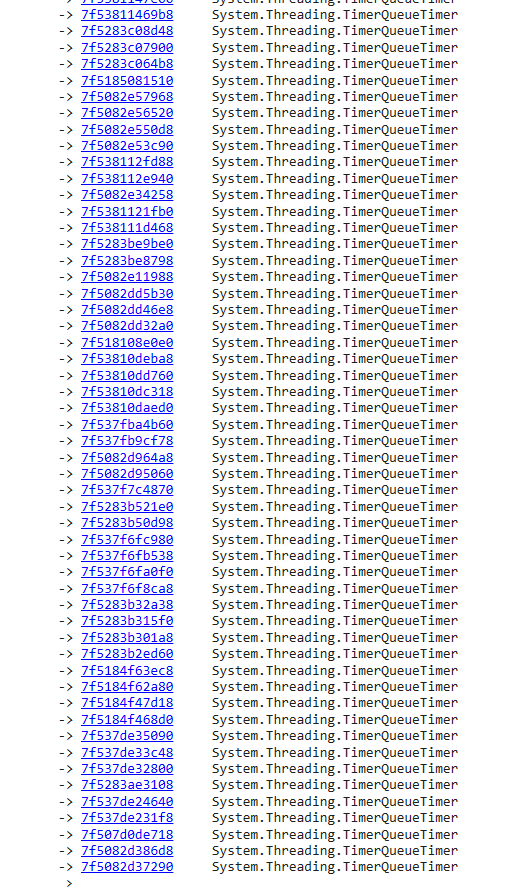
I waited, and waited, and waited, but it just never ends. Even on my powerful AMD Ryzen 9 9900x CPU + 64GB of RAM, it never really completed. I decided to end it prematurely.
But it’s not the dead end. If we can find it from bottom-up, we can find it from top-down.
0:000> !dumpheap -stat -type MemoryCache

Statistics:
          MT   Count  TotalSize Class Name
7f54bea48cc0       1         24 Microsoft.Extensions.Options.IConfigureOptions<Microsoft.Extensions.Caching.Memory.MemoryCacheOptions>[]
7f54bea48e38       1         24 Microsoft.Extensions.Options.IPostConfigureOptions<Microsoft.Extensions.Caching.Memory.MemoryCacheOptions>[]
7f54bea48fb0       1         24 Microsoft.Extensions.Options.IValidateOptions<Microsoft.Extensions.Caching.Memory.MemoryCacheOptions>[]
7f54bea4ac18       1         24 Microsoft.Extensions.Caching.Memory.MemoryCache+StringKeyComparer
7f54bc1f1fc0       1         24 EPiServer.Framework.Cache.Internal.MemoryCacheCompactor+<>c__DisplayClass11_0
7f54bc1f1ec8       1         24 EPiServer.Framework.Cache.Internal.MemoryCacheCompactor+<>c
7f54c29ac1e0       1         24 Microsoft.Extensions.Caching.Memory.MemoryCache+<>c
7f54bea46a00       1         40 Microsoft.Extensions.Options.OptionsFactory<Microsoft.Extensions.Caching.Memory.MemoryCacheOptions>
7f54bea468e0       1         40 Microsoft.Extensions.Options.UnnamedOptionsManager<Microsoft.Extensions.Caching.Memory.MemoryCacheOptions>
7f54c1c5b360       1         56 System.Runtime.Caching.MemoryCacheStore[]
7f54c29ac428       1         56 Microsoft.Extensions.Caching.Memory.MemoryCache+<GetCacheEntries>d__30
7f54c63c5560       1         64 System.Comparison<Microsoft.Extensions.Caching.Memory.MemoryCache+CompactPriorityEntry>
7f54bc1c56d8       1         72 EPiServer.Framework.Cache.Internal.MemoryCacheCompactor
7f54bea4aa48       4         96 Microsoft.Extensions.Logging.Logger<Microsoft.Extensions.Caching.Memory.MemoryCache>
7f54c0c380d8       2         96 Geta.NotFoundHandler.Core.Providers.RegexRedirects.MemoryCacheRegexRedirectRepository
7f54bea467c0       3        168 Microsoft.Extensions.Caching.Memory.MemoryCacheOptions
7f54ba931988       4        320 Microsoft.Extensions.Caching.Memory.MemoryCache
7f54c1def9f8      28        896 System.Runtime.Caching.MemoryCacheKey
7f54beb1b168      19      2,128 Microsoft.Extensions.Caching.Memory.MemoryCacheEntryOptions
7f54c1e40028      28      3,136 System.Runtime.Caching.MemoryCacheEntry
7f54c1c52d50     100      3,200 Microsoft.Dynamics.Commerce.RetailProxy.MemoryCacheProvider
7f54c1109928     351     19,656 Microsoft.AspNetCore.ResponseCaching.MemoryCachedResponse
7f54c63c5288       6  3,047,568 Microsoft.Extensions.Caching.Memory.MemoryCache+CompactPriorityEntry[]
7f54c1c54e28 218,050 12,210,800 System.Runtime.Caching.GCHandleRef<System.Runtime.Caching.MemoryCacheStore>[]
7f54c1c54200 218,050 17,444,000 System.Runtime.Caching.MemoryCache
7f54c1c565e0 872,200 20,932,800 System.Runtime.Caching.MemoryCacheEqualityComparer
7f54c1c55890 218,050 26,166,000 System.Runtime.Caching.MemoryCacheStatistics
7f54c1c54d78 872,200 27,910,400 System.Runtime.Caching.GCHandleRef<System.Runtime.Caching.MemoryCacheStore>
7f54c1c54b68 872,200 69,776,000 System.Runtime.Caching.MemoryCacheStore
Total 3,271,308 objects, 177,517,760 bytes
That’s even more than we expected. We expected some 800-ish MemoryCache, but there are 218050 instances. This must be done by mistake, probably by some code automatically creating the instance. Let’s pick one and see if it gives any clue
0:000> !dumpobj /d 7f5026755828
Name:        System.Runtime.Caching.MemoryCache
MethodTable: 00007f54c1c54200
EEClass:     00007f54c1c3dfd8
Tracked Type: false
Size:        80(0x50) bytes
File:        /app/System.Runtime.Caching.dll
Fields:
              MT    Field   Offset                 Type VT     Attr            Value Name
00007f54b7c8c8e0  40000f7       b0 ....IServiceProvider  0   static 0000000000000000 s_host
00007f54b8f6fb30  40000f8       a0 ...em.DateTimeOffset  1   static 00007f546003cb20 InfiniteAbsoluteExpiration
00007f54b73cbbb8  40000f9       a8      System.TimeSpan  1   static 00007f546003cb28 NoSlidingExpiration
00007f54c1c54e28  40000aa        8 ...ntime.Caching]][]  0 instance 00007f5026755878 _storeRefs
00007f54b6a19018  40000ab       38         System.Int32  1 instance                4 _storeCount
00007f54b6a19018  40000ac       3c         System.Int32  1 instance                0 _disposed
00007f54c1c55890  40000ad       10 ...ryCacheStatistics  0 instance 00007f503e868110 _stats
00007f54b6a2d2e0  40000ae       18        System.String  0 instance 00007f52220bee00 _name
00007f54c1c55518  40000af       20 ....Caching.Counters  0 instance 00007f50267558b0 _perfCounters
00007f54b697bac0  40000b0       40       System.Boolean  1 instance                0 _configLess
00007f54b697bac0  40000b1       41       System.Boolean  1 instance                1 _useMemoryCacheManager
00007f54be4cb508  40000b2       28  System.EventHandler  0 instance 00007f503e8683e0 _onAppDomainUnload
00007f54c1c55328  40000b3       30 ...ptionEventHandler  0 instance 00007f503e868420 _onUnhandledException
00007f54b73cbbb8  40000a6       78      System.TimeSpan  1   static 00007f546003caf8 s_oneYear
00007f54b69752a8  40000a7       80        System.Object  0   static 00007f53225244b8 s_initLock
00007f54c1c54200  40000a8       88 ...ching.MemoryCache  0   static 0000000000000000 s_defaultCache
00007f54c1fe69d0  40000a9       90 ...ryRemovedCallback  0   static 00007f53225244d0 s_sentinelRemovedCallback
0:000> !DumpObj /d 00007f52220bee00
Name:        System.String
MethodTable: 00007f54b6a2d2e0
EEClass:     00007f54b6a07b10
Tracked Type: false
Size:        70(0x46) bytes
File:        /usr/share/dotnet/shared/Microsoft.NETCore.App/6.0.36/System.Private.CoreLib.dll
String:      RetailServerContextCache
Fields:
              MT    Field   Offset                 Type VT     Attr            Value Name
00007f54b6a19018  40002ba        8         System.Int32  1 instance               24 _stringLength
00007f54b697e5a8  40002bb        c          System.Char  1 instance               52 _firstChar
00007f54b6a2d2e0  40002b9       d0        System.String  0   static 00007f521ffff3a0 Empty
So it’s RetailServerContextCache. Could it be just an coincidence? Let’s pick another one and see. Still RetailServerContextCache. Another one. RetailServerContextCache.
Now our suspicion grows. A quick search shows that RetailServerContextCache is the caching machinism within Microsoft Dynamics 365 Commerce. I built a tool that find a specific string from assemblies, and we quickly found it, this is the code that is creating the MemoryCache.
    public MemoryCacheProvider(
      string cacheMemoryLimitMegabytes,
      string pollingInterval,
      string slidingExpirationInMinutes)
    {
      this.memCache = new MemoryCache("RetailServerContextCache", new NameValueCollection(3)
      {
        {
          nameof (CacheMemoryLimitMegabytes),
          cacheMemoryLimitMegabytes ?? "100"
        },
        {
          nameof (PollingInterval),
          pollingInterval ?? "00:00:10"
        }
      });
      this.slidingExpiration = TimeSpan.FromMinutes((double) int.Parse(slidingExpirationInMinutes ?? "10"));
    }
Finding the actual code that leads to this call is quite troublesome, so I’ll spare you the details, but simply, whenever RetailServerContext.Create is called without a ETagContextCacheProvider, a new instance of ETagContextCacheProvider is created, and itself will create a new instance of MemoryCacheProvider.
Sadly this is in the official document by Microsoft, and that is disaster waiting to happen https://learn.microsoft.com/en-us/dynamics365/commerce/dev-itpro/consume-retail-server-api
While I’m not familiar enough with Dynamics 365 to give a sufficent recommendation, it feels like you should create a new instance of ETagContextCacheProvider and pass it to RetailServerContext.Create to avoid creating - a basically unlimited - number of MemoryCache