For a quite long time, I have a advocate against the use of OR inside the WHERE statement of SQL query. Let’s dive into it to know why you should avoid it, and what is the right solution for it.
For developers with C# and similar experience background, OR (||) is pretty harmless. We’ve been written Where(x => x.Name == "Something" || x.Order > 1000 ) hundreds of times, and never bat an eye about it. (AND (&&) is a bit different as we’ve learn that we should always put the cheapest/fastest to execute condition first so we can short circut the entire condition, saving us time and memory. With OR the order of conditions are irrelevant). And that experience is applied when writing SQL statement. It should work the same, right? No, it doesn’t, and in most cases, it IS a costly mistake.
Let’s take a simple example to demonstrate that. Let’s have a simple query like this
  SELECT TOP (1000) [OrderGroupId]
      ,[InstanceId]
      ,[AffiliateId]
      ,[Name]
      ,[CustomerId]
      ,[CustomerName]
      ,[AddressId]
      ,[ShippingTotal]
      ,[HandlingTotal]
      ,[TaxTotal]
      ,[SubTotal]
      ,[Total]
      ,[BillingCurrency]
      ,[Status]
      ,[ProviderId]
      ,[SiteId]
      ,[OwnerOrg]
      ,[Owner]
      ,[MarketId]
      ,[Epi_MarketName]
      ,[Epi_PricesIncludeTax]
      ,[MigrationOrderGroupId]
      ,[CustomerEmail]
  FROM [dbo].[OrderGroup] og
  where CustomerId = '126529A6-0C30-4726-9399-C4E29EE7FE70'
We are getting the first 1000 orders of customer with specific id. The execution plan turns out nice, and the query is fast
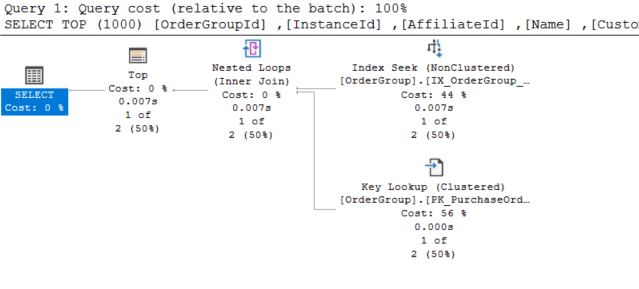
Table 'OrderGroup'. Scan count 1, logical reads 7,
IO statistics is fine. We could do better with the key lookup, but that’s beside the point.
Now because we need to extend our query to find order by MigrationObjectId from a different table as well, so let’s add the OR condition to the query. Just like we normally did with C#
SELECT TOP (1000) [OrderGroupId]
      ,[InstanceId]
      ,[AffiliateId]
      ,[Name]
      ,[CustomerId]
      ,[CustomerName]
      ,[AddressId]
      ,[ShippingTotal]
      ,[HandlingTotal]
      ,[TaxTotal]
      ,[SubTotal]
      ,[Total]
      ,[BillingCurrency]
      ,[Status]
      ,[ProviderId]
      ,[SiteId]
      ,[OwnerOrg]
      ,[Owner]
      ,[MarketId]
      ,[Epi_MarketName]
      ,[Epi_PricesIncludeTax]
      ,[MigrationOrderGroupId]
      ,[CustomerEmail]
  FROM [dbo].[OrderGroup] og
  inner join dbo.OrderGroup_PurchaseOrder po on og.OrderGroupId =  po.ObjectId
  where CustomerId = '126529A6-0C30-4726-9399-C4E29EE7FE70'
  Or MigrationObjectId = 3567791
Can we call it a day and commit the code and move to the next task? No, try to run the query and see
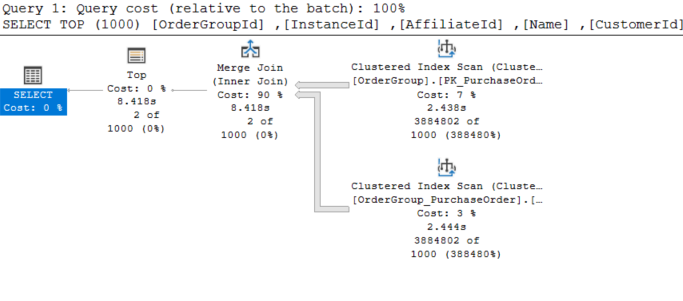
Uh oh, the big fast line of Clustered Index Scan is … not good. IO statistics take a big hit as well
(2 rows affected)
Table 'OrderGroup_PurchaseOrder'. Scan count 1, logical reads 50728, physical reads 0, page server reads 0, read-ahead reads 0, page server read-ahead reads 0, lob logical reads 0, lob physical reads 0, lob page server reads 0, lob read-ahead reads 0, lob page server read-ahead reads 0.
Table 'OrderGroup'. Scan count 1, logical reads 138524, physical reads 0, page server reads 0, read-ahead reads 0, page server read-ahead reads 0, lob logical reads 0, lob physical reads 0, lob page server reads 0, lob read-ahead reads 0, lob page server read-ahead reads 0.
Could adding an index on the MigrationObjectId column help? No it does not, we can validate that by querying only that column - the index is doing its job just fine.
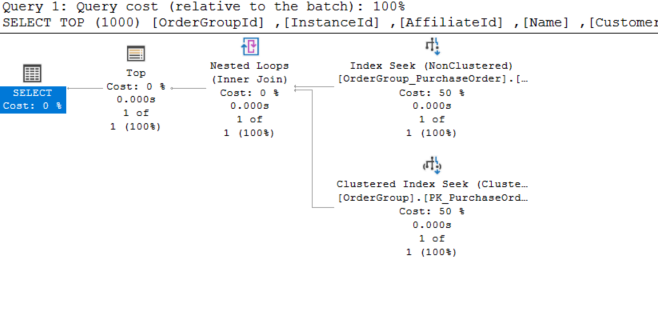
So what’s the problem here? The OR confused the optimizer and prevented it from utilizing any useful index, so it fallback to the “safe” (yet extremely slow and costly) path of full Clustered Index Scan. In this case it’s worse because it has to do a scan on both tables.
I was asked if this is a problem with parameter sniffing? No, it’s not. We can simply validate that by adding OPTION (RECOMPILE) hint to force the optimizer to compile a new execution plan, same thing
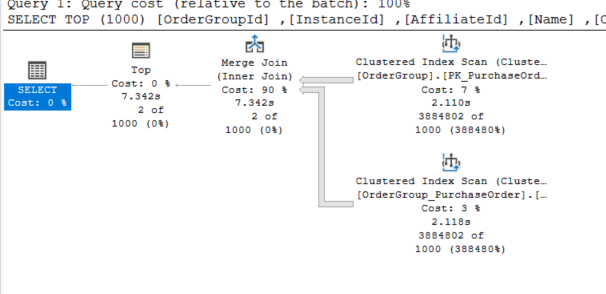
The only right option is to split the query and use UNION to combine the results
SELECT TOP (1000) [OrderGroupId]
      ,[InstanceId]
      ,[AffiliateId]
      ,[Name]
      ,[CustomerId]
      ,[CustomerName]
      ,[AddressId]
      ,[ShippingTotal]
      ,[HandlingTotal]
      ,[TaxTotal]
      ,[SubTotal]
      ,[Total]
      ,[BillingCurrency]
      ,[Status]
      ,[ProviderId]
      ,[SiteId]
      ,[OwnerOrg]
      ,[Owner]
      ,[MarketId]
      ,[Epi_MarketName]
      ,[Epi_PricesIncludeTax]
      ,[MigrationOrderGroupId]
      ,[CustomerEmail]
  FROM [dbo].[OrderGroup] og
  inner join dbo.OrderGroup_PurchaseOrder po on og.OrderGroupId =  po.ObjectId

  where CustomerId = '126529A6-0C30-4726-9399-C4E29EE7FE70'
  UNION
  SELECT TOP (1000) [OrderGroupId]
      ,[InstanceId]
      ,[AffiliateId]
      ,[Name]
      ,[CustomerId]
      ,[CustomerName]
      ,[AddressId]
      ,[ShippingTotal]
      ,[HandlingTotal]
      ,[TaxTotal]
      ,[SubTotal]
      ,[Total]
      ,[BillingCurrency]
      ,[Status]
      ,[ProviderId]
      ,[SiteId]
      ,[OwnerOrg]
      ,[Owner]
      ,[MarketId]
      ,[Epi_MarketName]
      ,[Epi_PricesIncludeTax]
      ,[MigrationOrderGroupId]
      ,[CustomerEmail]
  FROM [dbo].[OrderGroup] og
  inner join dbo.OrderGroup_PurchaseOrder po on og.OrderGroupId =  po.ObjectId
  WHERE MigrationObjectId = 3567791
The execution plan looks (much) better
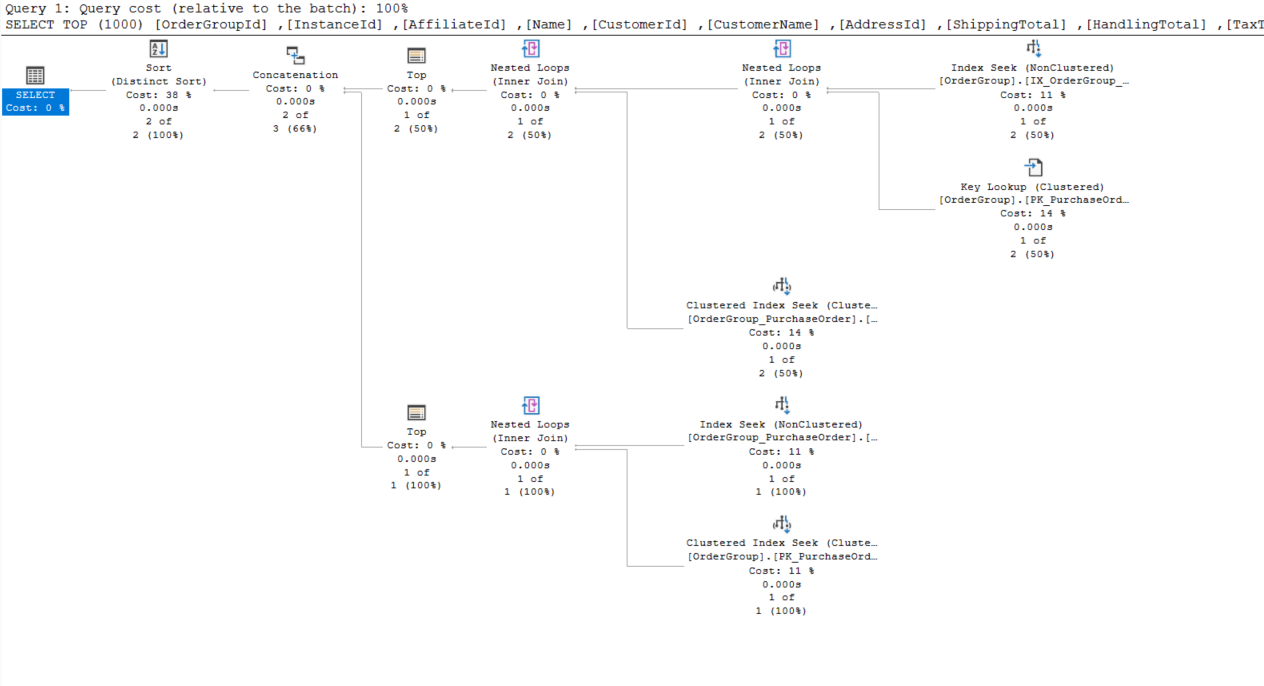
and IO statistics in normal range
(2 rows affected)
Table 'Worktable'. Scan count 0, logical reads 0, physical reads 0, page server reads 0, read-ahead reads 0, page server read-ahead reads 0, lob logical reads 0, lob physical reads 0, lob page server reads 0, lob read-ahead reads 0, lob page server read-ahead reads 0.
Table 'OrderGroup'. Scan count 1, logical reads 10, physical reads 0, page server reads 0, read-ahead reads 0, page server read-ahead reads 0, lob logical reads 0, lob physical reads 0, lob page server reads 0, lob read-ahead reads 0, lob page server read-ahead reads 0.
Table 'OrderGroup_PurchaseOrder'. Scan count 1, logical reads 6, physical reads 0, page server reads 0, read-ahead reads 0, page server read-ahead reads 0, lob logical reads 0, lob physical reads 0, lob page server reads 0, lob read-ahead reads 0, lob page server read-ahead reads 0.
The problem does not happen if we use AND instead of OR - as long as there is a suffient index on columns that need to be queried.
The only case that OR makes senses/can work in a WHERE statement is that you are querying columns on same table, or even same column (in that case, use IN could be a better choice), later versions of SQL Server has better optimizations so it can work out a plan given you have proper indexes on those columns. Not the composite index, like (Column1, Column2), but only (Column1) and (Column2), separately. However, the trick of separating query and use UNION would still work, especially if you are using some older versions. The reason to avoid OR is once you allow some in your code base, you might (and likely will) overlook some statements when joining tables, only for it to blows up later on production, at 3AM, on a Saturday. Better to avoid that, huh?
Moral of the story? SQL is different from your “server” language. What could be normal in your C# does not translate well into SQL. Concise and beauty are not the goal for your stored procedure, performance is. Of course, you can always format your query to be better, but the most important task when writing a query to run a few tests of your query on a suffient big data set and ensure it behaves the way you want it to be. Test, don’t assume.